Short answerTo edit DSD metadata on macOS, use a tag editor that writes both DSD file types in place. DSF stores a standard ID3v2 tag at the end of the file. DFF (DSDIFF) has no official metadata chunk, so the convention is an ID3v2 chunk inside the file. Retag is a native Mac batch tag editor that writes both, alongside FLAC, ALAC and MP3 in one grid, previews every change before writing, and never touches the DSD audio. It is free to download.
How DSF and DFF store tags
DSD (Direct Stream Digital) music is sold in two container formats. They hold the same kind of 1-bit audio, but they handle metadata very differently, and that difference is why DSD tagging trips up so many apps.
| DSF (.dsf) | DFF / DSDIFF (.dff) | |
|---|---|---|
| Designed by | Sony | Philips |
| Official tag support | Yes: one ID3v2 tag | Only a small DIIN chunk (title, artist) |
| Where tags live | End of file, located by a pointer in the header | By convention, an ID3 chunk holding ID3v2 |
| Cover art | ID3v2 picture frame | ID3v2 picture frame in the ID3 chunk |
| Player support for tags | Broad | Good for ID3 in DSD-aware players and servers; varies elsewhere |
Because a DSF tag sits at the end of the file and the header points to it, a careless editor that changes the tag size without updating the pointer leaves a file that some players can’t read. And because DFF has no official tag chunk, many editors either skip DFF entirely, open it read-only, or tell you to convert to DSF first. Retag reads and writes tags through TagLib, the open-source tagging library used by many music apps, which handles both containers properly.
The audio is a separate chunk from the tags. Editing tags in either format never needs the DSD stream to be decoded, converted or rewritten, so done right, tagging is bit-perfect.
Step by step: tag DSD files in Retag
Open your DSD folder
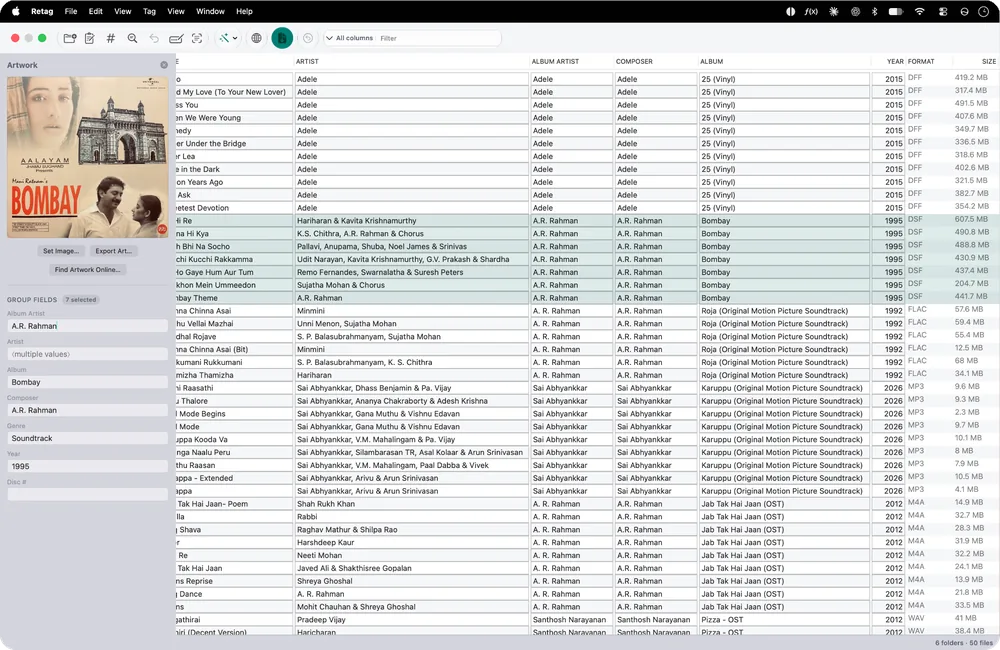
Install Retag from the Mac App Store (macOS 14 or later) and open the folder holding your DSF and DFF files. Every file becomes a row, and the Format column shows DSF or DFF.
Select the tracks to fix
Click, Shift-click or ⌘A. Sort or filter by Format to work on DSD only, or keep DSD next to FLAC and MP3 so a whole collection gets consistent tags.
Edit or look up the tags
Type into any column, or use the Group Fields panel to set album artist, album, composer, genre and year for every selected file at once. Use Find Artwork Online for cover art, MusicBrainz and Discogs lookups for album data, and mojibake repair if the text is garbled.
Review what will change
Every edit is staged in the grid and nothing is written yet. With a box set of multi-gigabyte DSD files, this is where you catch a typo before it lands on fifty tracks.
Apply
Click Apply. Retag writes the ID3v2 tag to each DSF and the ID3v2 chunk to each DFF. If you change your mind, multi-level Undo still has you covered. The free version applies up to 5 files per run; Retag Pro has no limit.
What to look for in a DSD tag editor
“Supports DSD” can mean anything from “reads the title of a DSF” to full batch editing of both containers. Before trusting a tool with a hi-res library, check these:
Does it write DFF, or only DSF? Many DSD downloads and SACD rips are DFF, and plenty of editors stop at DSF or open DFF read-only. Retag writes both.
Does it tag in place? Converting DFF to DSF just to add tags is slow, and a converter that goes through PCM changes the audio. Retag tags the file you already have.
Can it edit hundreds of files at once? DSD box sets are big, and one track at a time doesn’t scale. Retag puts every file in one grid.
Can you check before it writes, and undo after? Rewriting multi-gigabyte files twice to fix a typo wastes an evening. Retag stages every change and keeps Undo after Apply.
Does it embed cover art in both formats? Players and servers show the art stored in the tag, so it has to go into DFF as well as DSF. Retag does both.
Does it fix garbled text? Japanese and European hi-res stores often ship broken characters. Retag repairs Shift_JIS and Latin-1 mojibake in one pass.
Is it a Mac app? A lot of DSD tooling is Windows-first. Retag is native to macOS 14 and later.
Common DSD tagging problems, fixed
“My DFF files show no tags in my player.”
The files probably have no ID3 chunk yet, or only the DIIN title and artist. Tag them in Retag and Apply; DSD-aware players and servers that read ID3 in DFF will then pick up the full set, including cover art. If one particular player still ignores DFF tags, that player doesn’t read the ID3 chunk, and keeping a DSF copy for it is the usual answer.
“The album title is full of symbols like ‘“Œ‹ž’.”
That is mojibake: Japanese text saved as Shift_JIS (CP932) and read as Western text. Select the affected tracks and run Retag’s encoding repair to turn it back into the right characters (here, 東京) in one pass. The same fix works for broken accents such as é instead of é.
“Tracks from the same album show up as separate albums.”
Usually the album artist differs between tracks, or is empty on some. Select the album, set one Album Artist in Group Fields, and use Make Compilation (Retag Pro) for various-artists releases.
“My media server sorts DSD albums wrongly.”
Fix track and disc numbers in the grid, then use Retag’s Plex, Jellyfin or Navidrome naming preset to rename files and folders from the tags with a live preview, so the server scans the library cleanly.
FAQ
What is the best DSD tag editor for Mac?
Look for a native Mac editor that writes both DSF and DFF tags in place, never converts or decodes the audio, edits many files at once, previews before writing, and can undo. Retag does all of these, in one spreadsheet grid with 17 other formats, and it is free to download.
Can DFF files have tags?
Yes, with a caveat. The DSDIFF specification only defines a small DIIN chunk for title and artist. The common convention is an ID3v2 tag in an ID3 chunk, which many DSD-aware players and servers read. Retag writes that chunk, so DFF files carry the same tags as DSF.
Where are tags stored in a DSF file?
At the end of the file, as a standard ID3v2 tag. A pointer in the DSD chunk at the start of the file gives its offset, so an editor has to keep that pointer and the file size correct.
Should I convert DFF to DSF just to tag it?
Not if your editor can tag DFF. Converting is a workaround for tools that can’t, and a converter that goes through PCM will change the audio. With Retag you tag DFF in place.
Can I embed cover art in DSF and DFF files?
Yes. Cover art is an ID3v2 picture frame, which DSF supports natively and DFF supports through its ID3 chunk. In Retag you set, find or export artwork for every selected file at once.
Does tagging DSD files change the sound?
No. Tags live in their own chunk, separate from the DSD audio. Retag only rewrites the tag, so DSD64, DSD128, DSD256 and higher-rate files play exactly as before.
Why do my DSD tags show garbled characters?
The text was saved in one encoding and read as another, often Japanese Shift_JIS (CP932) or Latin-1 read as UTF-8. Retag detects this and converts it back across a whole selection in one pass.
Is Retag free?
Free to download, with unlimited editing and previewing; the free version applies changes to up to 5 files per run. Retag Pro removes the limit for $0.99 a month or $6.99 a year, each with 7 days free for new subscribers, or $12.99 once. See pricing.
Tag your DSD library properly.
Retag tags DSF and DFF right next to the rest of your library, shows you every change before it writes, and leaves the audio alone.
Download on the Mac App StoreFree to download for macOS 14 or later, with no account and no tracking. More about Retag