Retag is a native macOS 14 or later batch music tag editor, available free on the Mac App Store. It is built for anyone who wants precise, non-destructive control over their music metadata: the local-library enthusiast, the audiophile with a DSD collection, and anyone who has spent too long editing tags one file at a time in a media player that was not designed for the job.
The Problem with Tagging at Scale
Music metadata is easy to ignore until it is not. A library of a few hundred albums accumulates inconsistencies quietly: title-case in some tracks, all-caps in others, MusicBrainz Artist IDs missing, album art embedded in MP3s but absent in FLAC rips, disc number fields sitting empty. Media servers like Plex, Jellyfin, and Navidrome surface every one of these gaps in their UI.
Most tagging tools approach this as a file-at-a-time problem. You open one track, fix a field, save, move on. For a collection of any size, that is not a workflow. It is a chore that compounds.
Retag treats tagging as the spreadsheet problem it actually is. Open a folder, see every file as a row, edit any field across any selection in one move, confirm once. The changes preview before anything touches disk.
The Spreadsheet Approach
The main view in Retag is a grid: one row per audio file, one column per metadata field. Columns are configurable; you choose which fields you care about and save those configurations as named presets. A preset for a classical library might show Title, Composer, Album Artist, Conductor, Work, and Disc. A preset for a DJ record pool might show Title, Artist, BPM, Key, and Genre.
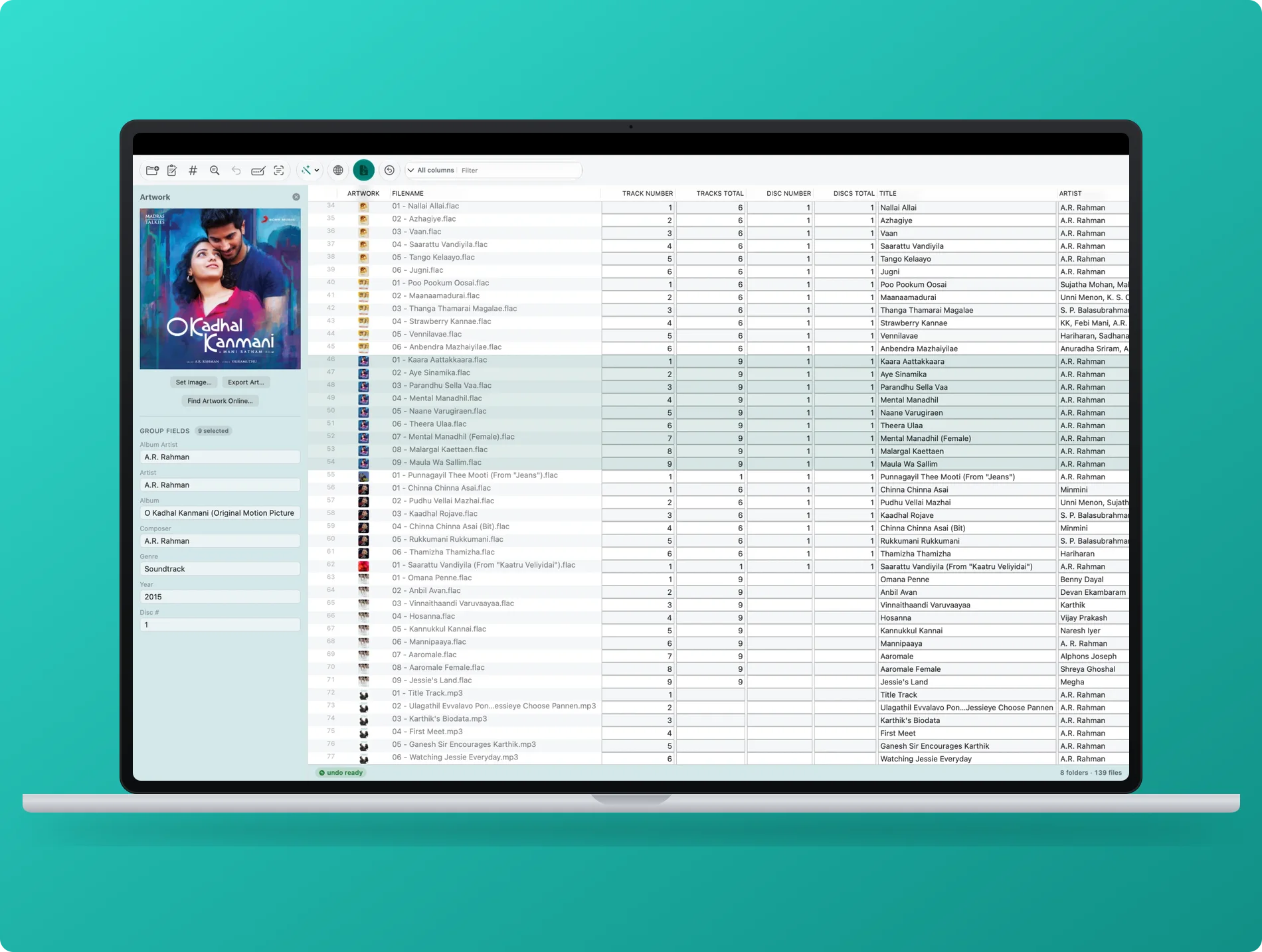
Edit every track at once.
Select any group of rows, edit a field in the inspector, and the value propagates to every selected file's pending change set. Nothing is written yet. You see the proposed value alongside the current value for each affected file, which means you can catch mistakes before they matter.
Multi-level Undo means any mistake after Apply is also recoverable. Retag does not treat your files as a write-once surface.
Configurable Columns
Show exactly the fields you need. Save column layouts as named presets for different genres or workflows.
Batch Edit
Select any number of files, edit one field, apply to all. One action, one confirmation, zero repetition.
Non-Destructive Preview
Every change is staged and previewed before it touches disk. Apply is always a deliberate, explicit step.
Multi-Level Undo
Applied a change you regret? Undo goes back through your history, not just one step.
Online Lookup
Match tracks by acoustic fingerprint and pull tags and artwork from MusicBrainz, Discogs, and AcoustID.
Media-Server Renaming
Rename for Plex, Jellyfin, and Navidrome with built-in templates, previewed live before any file moves.
19 Formats, Including Native DSD
Retag reads and writes tags across 19 audio formats via TagLib: MP3, FLAC, M4A, AAC, MP4, WAV, AIFF, OGG Vorbis, Opus, Ogg FLAC, Speex, WavPack, APE, MusePack, TrueAudio, WMA, and native DSD in both .dsf and .dff containers.
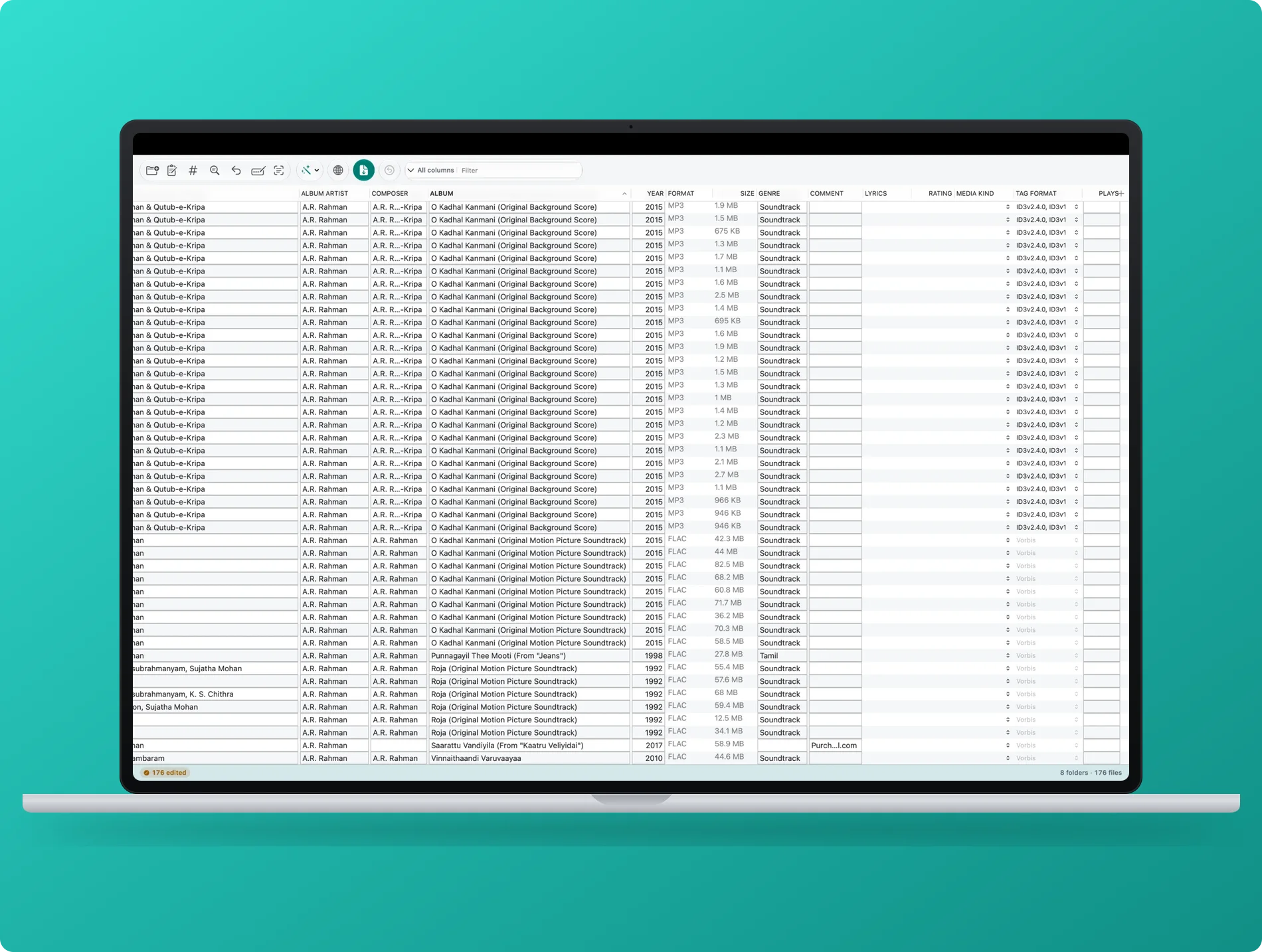
Every format in your library.
Native DSD support is worth noting on its own. The .dsf and .dff formats are common among high-resolution audio collectors but poorly served by most tagging software. Retag reads and writes DSD metadata in the same grid as everything else, no special-case workflow required.
Format coverage matters for mixed libraries. A typical collection ripped from CDs over two decades might include MP3, FLAC, and Apple Lossless side by side, with acquired DSD downloads in a separate folder. Retag handles all of them in the same session without switching tools.
Online Lookup: MusicBrainz, Discogs, and AcoustID
Manual tagging is sometimes unavoidable for obscure releases, but for most commercial music Retag can fill in the gaps automatically. Select a track or an album and trigger a lookup against MusicBrainz or Discogs by search. The results come back as a candidate list; you pick the match, Retag stages the proposed fields, and you confirm before anything is written.
For files with damaged or absent tags, Retag can go further. AcoustID acoustic fingerprinting identifies a recording by the sound itself rather than its filename or existing metadata. Retag generates a fingerprint for the audio, submits it to the AcoustID service, and retrieves the MusicBrainz recording ID. From there it populates title, artist, album, and release metadata. A file with no tags at all can come back fully identified.
Cover art is fetched from the Cover Art Archive (linked to MusicBrainz releases) and Discogs. Art is embedded directly into the files, not stored externally.
One-Click Workflows
Repeated operations across a library deserve to be automated. Retag includes a set of built-in cleanup operations: case unification across title and artist fields, ID3v1 tag stripping, encoding repair for malformed frames, and bulk field cleanup. Each can be run on a selection or on an entire folder.
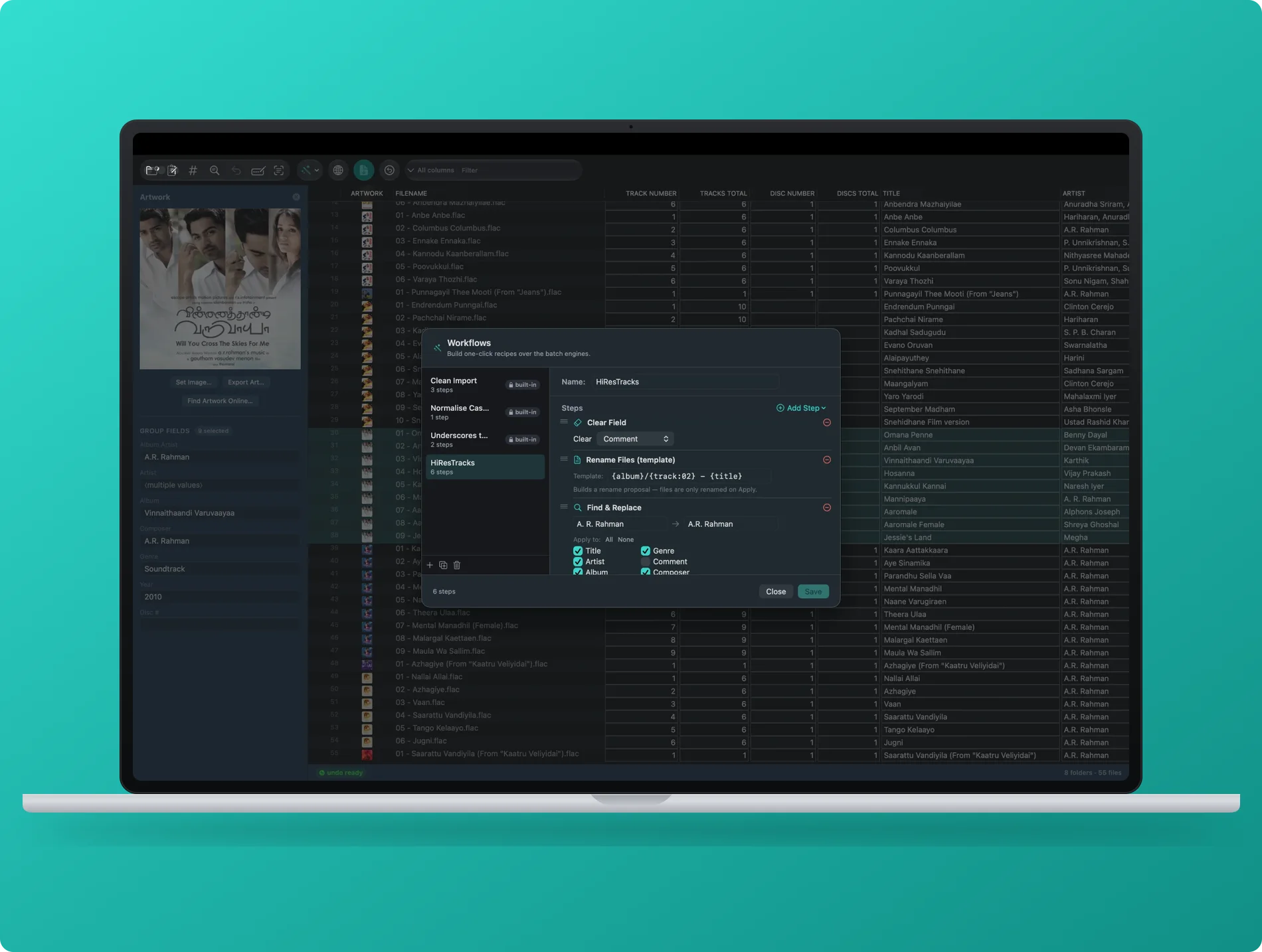
One-click cleanup workflows.
The workflow builder lets you combine any sequence of operations into a saved recipe. Drag the steps into order, name it, and it appears in the workflow menu. A cleanup sequence you run on every album import, for example a fix-case pass followed by a genre normalize and an art embed, can become a single click.
Additional Capabilities
Retag covers the full practical surface of music metadata management:
- Batch rename from tags: Rename files from their metadata using a pattern with live preview. Naming presets for Plex, Jellyfin, and Navidrome are included.
- Filename to tags: Parse an existing filename pattern back into tag fields. Useful for files ripped with bare filenames and no embedded metadata.
- Lyrics editor: View and edit embedded lyrics (both synchronized and unsynchronized).
- Ratings (POPM): Read and write track ratings in the Popularimeter frame.
- Apple Music library import: Read your Apple Music library (read only) to see which files are already in your library alongside their Retag metadata.
- Playlist export: Export playlists in M3U, PLS, XSPF, and CSV formats.
- ID3v1 strip and FLAC ID3 normalization: Clean legacy tag formats that cause problems in modern players.
Nothing is written to disk until you confirm Apply. Preview is not optional: it is the default.
Privacy and Sandboxing
Retag is sandboxed and distributed through the Mac App Store. File access is user-initiated: Retag can only read and write files and folders that you explicitly open or grant access to in the standard macOS file picker. No files leave your Mac. There is no account, no login, and no telemetry. The app works entirely offline except when you trigger an explicit online lookup from MusicBrainz, Discogs, or AcoustID.
Pricing
Retag is free to download. The free tier is fully functional for scanning, staging, and previewing changes; the only limitation is that Apply is capped at 5 files per run. Retag Pro is a one-time in-app purchase that removes this limit and unlocks unlimited Apply across any number of files. There is no subscription and no recurring charge.
Frequently Asked Questions
What is Retag?
Retag is a native macOS batch music tag editor for the Mac App Store. It lets you view and edit metadata across large collections of audio files in a spreadsheet-style grid, with non-destructive preview, MusicBrainz and AcoustID lookup, and one-click cleanup workflows. It supports 19 audio formats including native DSD. Made by ARRcade, an indie studio based in Singapore.
Is Retag free?
Yes. Retag is free to download. Scanning, staging, and previewing changes are unlimited on the free tier. Applying changes is limited to 5 files per run. Retag Pro is a one-time in-app purchase that removes the Apply limit. No subscription, no account, no tracking.
What audio formats does Retag support?
Retag supports 19 formats via TagLib: MP3, FLAC, M4A, AAC, MP4, WAV, AIFF, OGG Vorbis, Opus, Ogg FLAC, Speex, WavPack, APE, MusePack, TrueAudio, WMA, and native DSD in .dsf and .dff containers.
How does AcoustID fingerprinting work in Retag?
Retag generates an acoustic fingerprint from the audio content of a file and submits it to the AcoustID service. AcoustID returns a MusicBrainz recording ID, which Retag uses to fetch full metadata. This works even when a file has no existing tags, because identification is based on the sound itself rather than filenames or embedded data.
Is Retag non-destructive?
Yes. All changes are staged and previewed before anything is written to disk. Apply is always a deliberate step. Retag also supports multi-level Undo, so applied changes can be reversed. File access is sandboxed: Retag can only touch files you explicitly open.
Does Retag support Plex and Jellyfin naming conventions?
Yes. Retag includes naming presets for Plex, Jellyfin, and Navidrome in its batch rename feature. You can also define and save custom naming patterns with live preview before any file is renamed.
Clean tags. Proper metadata.
Your library, organized.
Download Retag free on the Mac App Store. Scan, preview, and clean your entire music library before committing a single change.
Download on the Mac App Store